CpuPDB User Manual
Guide for search, similarity analysis, pocket inspection, and interaction interpretation
Overview
The CpuPDB platform integrates three core functional entries: Start Search for routine structure retrieval, Protein Similarity for homology and family network analysis, and Pocket Similarity for targeted binding pocket comparison and analysis.
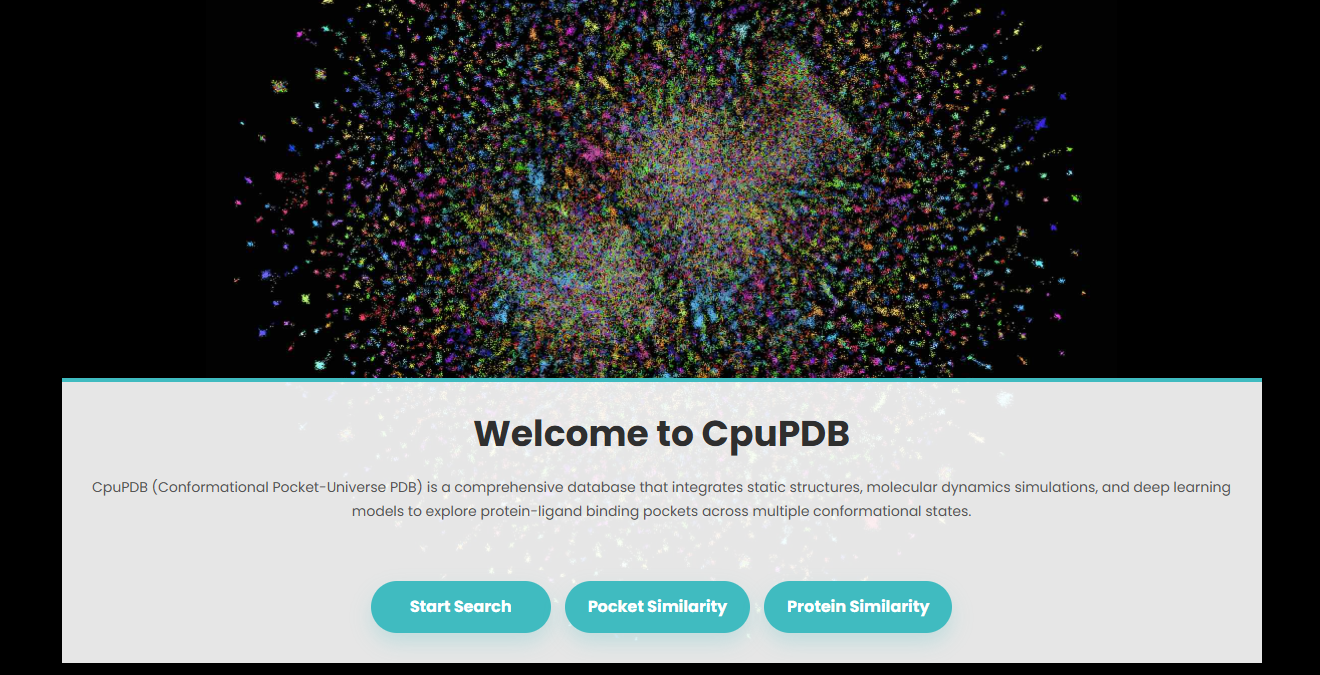
1. Search Page
1.1 Search Based on PDB ID, Ligand ID, or Ligand SMILES
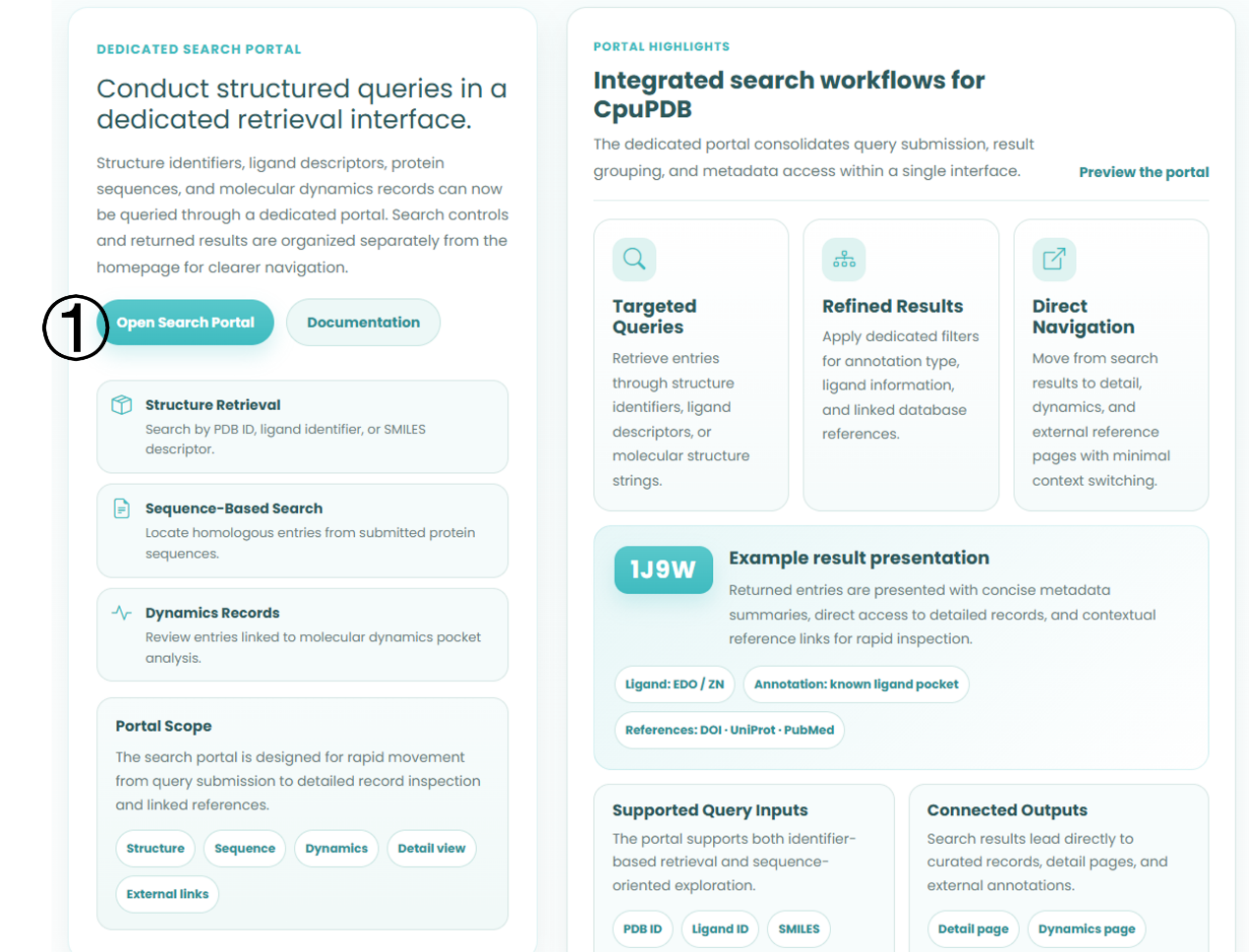
Users can perform single-parameter or combined searches using the above identifiers through the dedicated search portal.
Workflow
- Click Open Search Portal on the homepage to enter the dedicated retrieval interface.
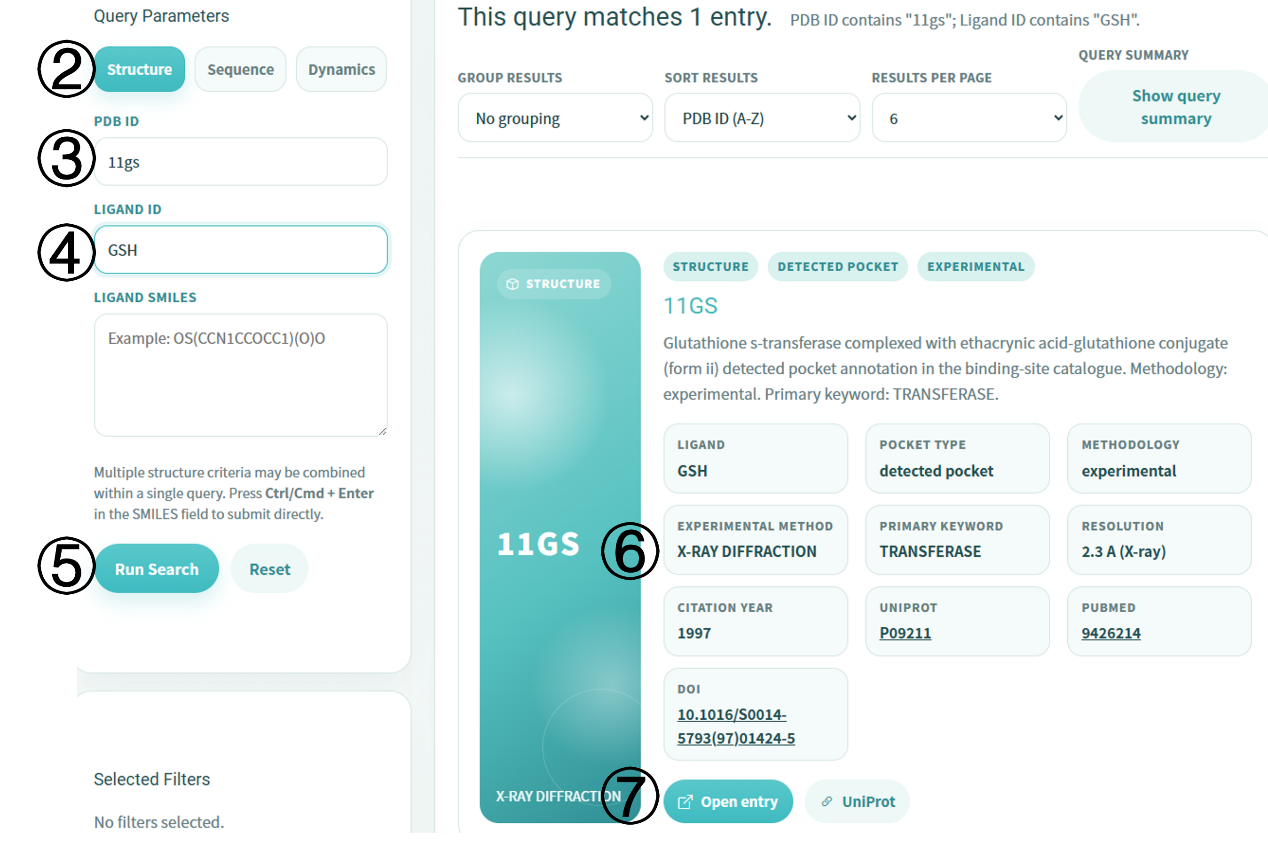
- Switch to the Structure tab in the left Query Parameters panel to activate structure-based search mode.
- Enter a target PDB ID, such as 11GS. For combined queries, also fill in the Ligand ID, such as GSH, or a Ligand SMILES string.
- Click Run Search to submit the query. The SMILES box also supports Ctrl/Cmd + Enter for quick submission.
- Browse matched entries in the result area. Each entry is presented as an independent card with a metadata summary and external database links.
- Click Open entry on the target result card to access the detailed protein-ligand interaction interface.
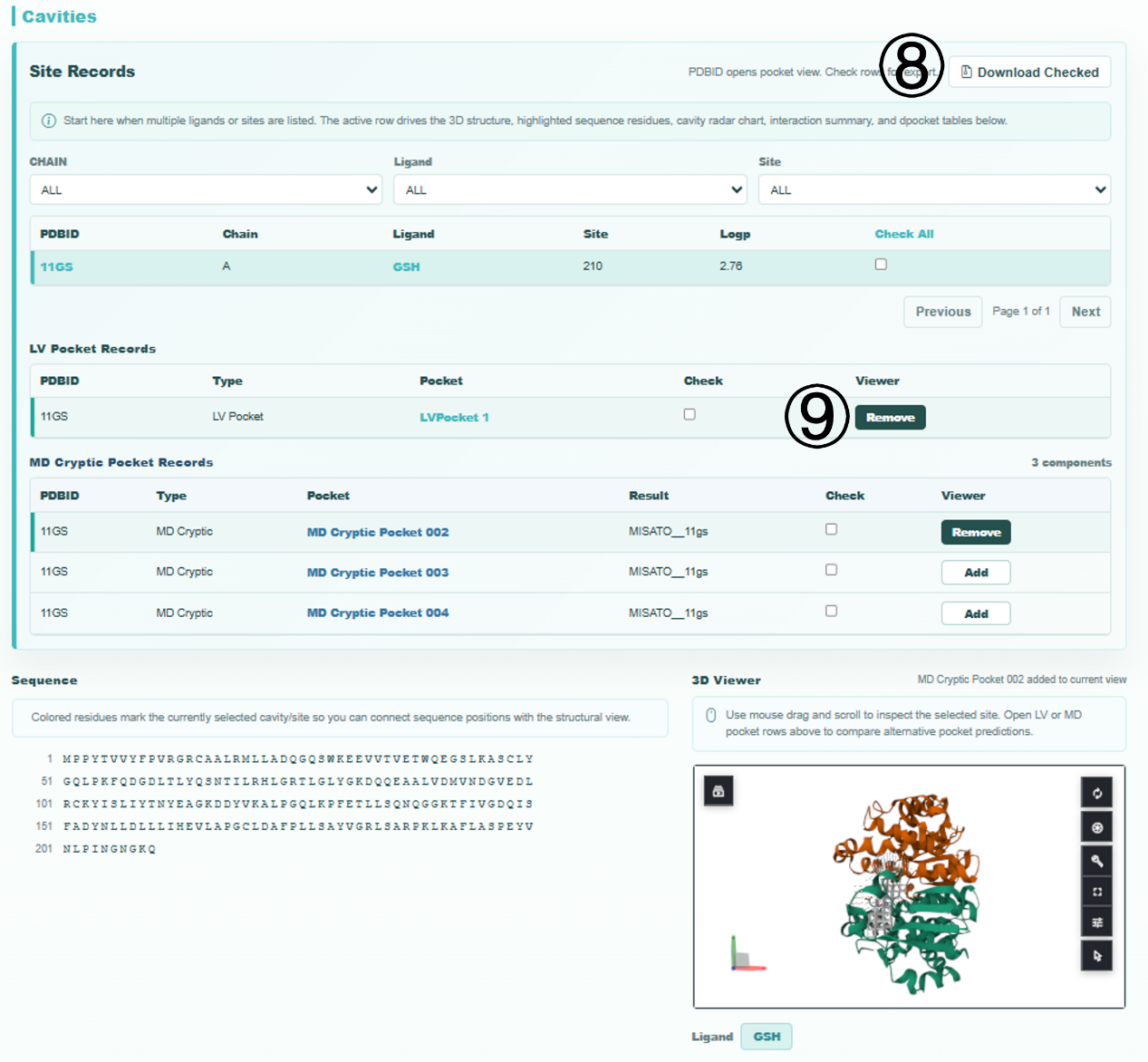
Detail Page Pocket Categories
- Site Records: experimentally validated binding pockets from ligand-bound crystal structures.
- LV Pocket Records: pockets predicted by the LVPocket algorithm.
- MD Cryptic Pocket Records: conformational cryptic pockets identified from molecular dynamics trajectories.
Interactive Pocket Inspection
Use the Add button in the Viewer column to load a selected pocket into the embedded 3D viewer for structural inspection. Click Remove to unload the pocket, enabling side-by-side comparison of different pocket prediction results. Rotate the structure with left-click drag and zoom with the mouse scroll wheel. Residues corresponding to the selected cavity are synchronously highlighted in the sequence panel.
Interactive Contacts
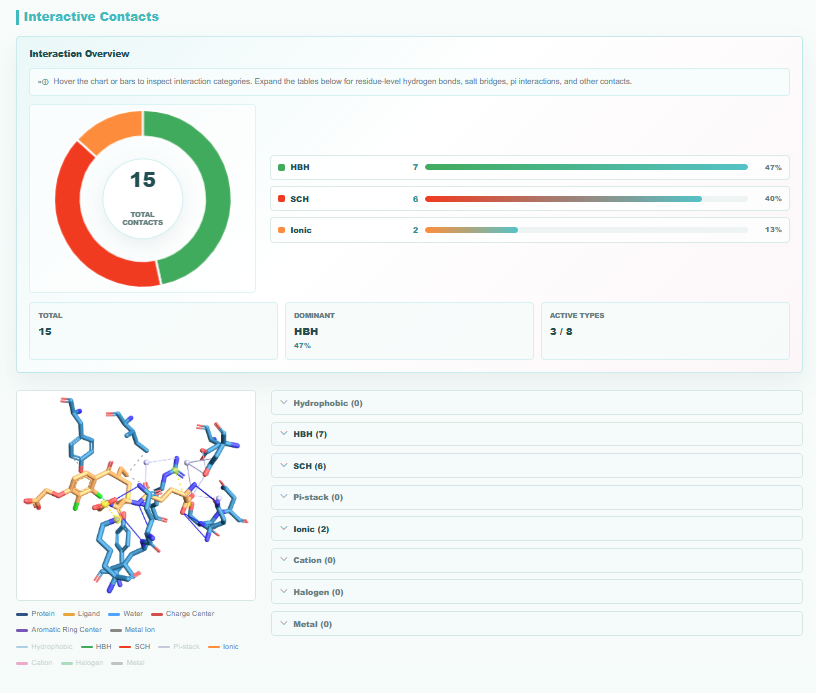
The Interactive Contacts section provides systematic characterization of protein-ligand non-covalent interactions. The overview dashboard includes a donut chart and summary cards showing total intermolecular contacts, dominant interaction type and proportion, and the number of detected interaction categories out of eight total types.
Search Results
- PDB ID / Open entry: redirects to the Detail interface.
- DOI / UniProt ID / PubMed ID: hyperlink to official external databases.
- Ligand: ligand identifier using the HET code convention from RCSB PDB.
- Extended metadata: experimental methodology, structure resolution, citation year, and primary functional keyword support rapid result screening.
1.2 Protein Sequence-Based Search
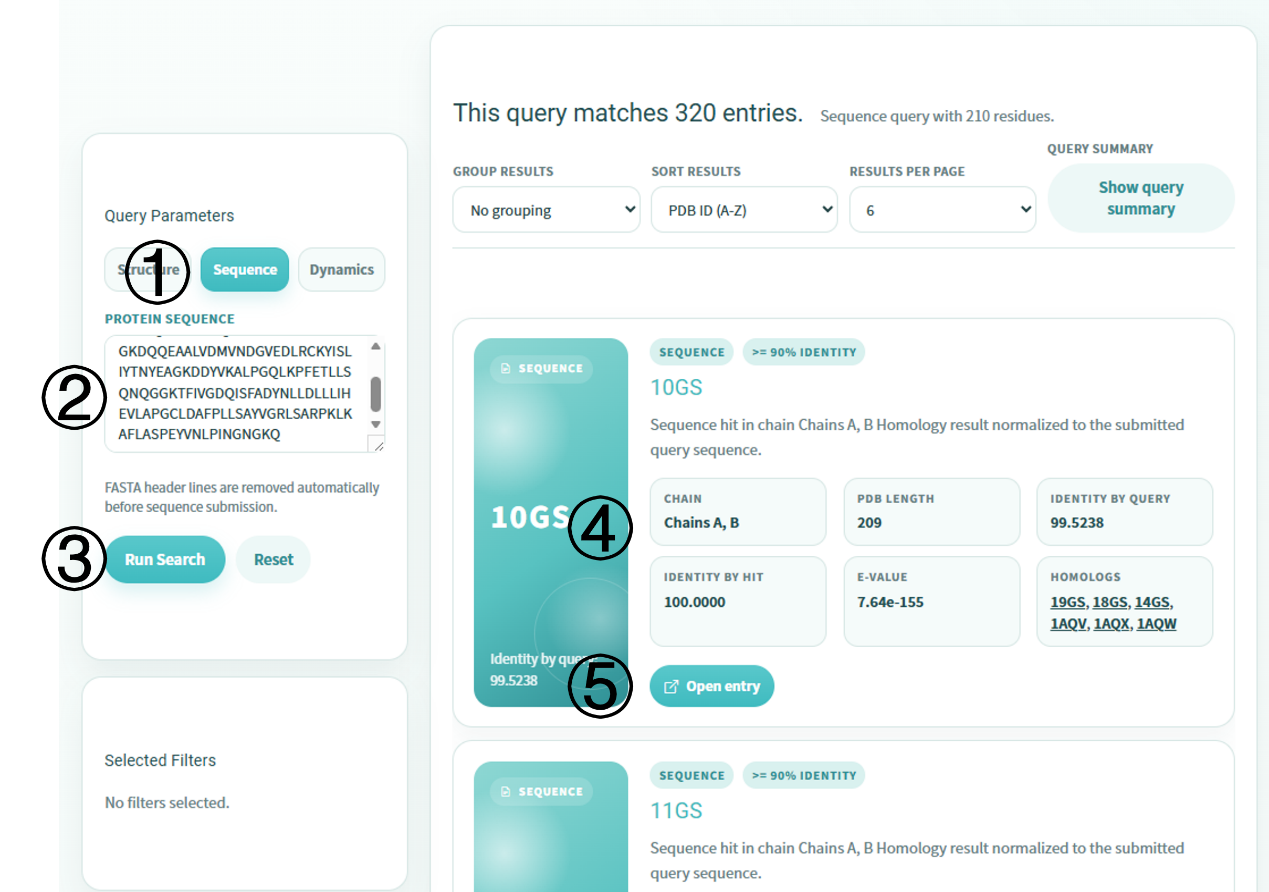
Users can submit protein sequences for homology-based retrieval, with alignment results generated through BLAST. FASTA header lines are automatically stripped to simplify submission and reduce formatting errors.
Workflow
- Enter the search portal and switch to the Sequence tab in the left Query Parameters panel.
- Paste the target protein sequence into the input field. FASTA header lines are removed automatically.
- Click Run Search to execute BLAST sequence alignment.
- Browse matched entries in the result area. Use grouping, sorting, results-per-page controls, or filters to refine the result set.
- Click Open entry on a target result card to navigate to the detailed protein-ligand interaction interface.
Protein Sequence Search Results
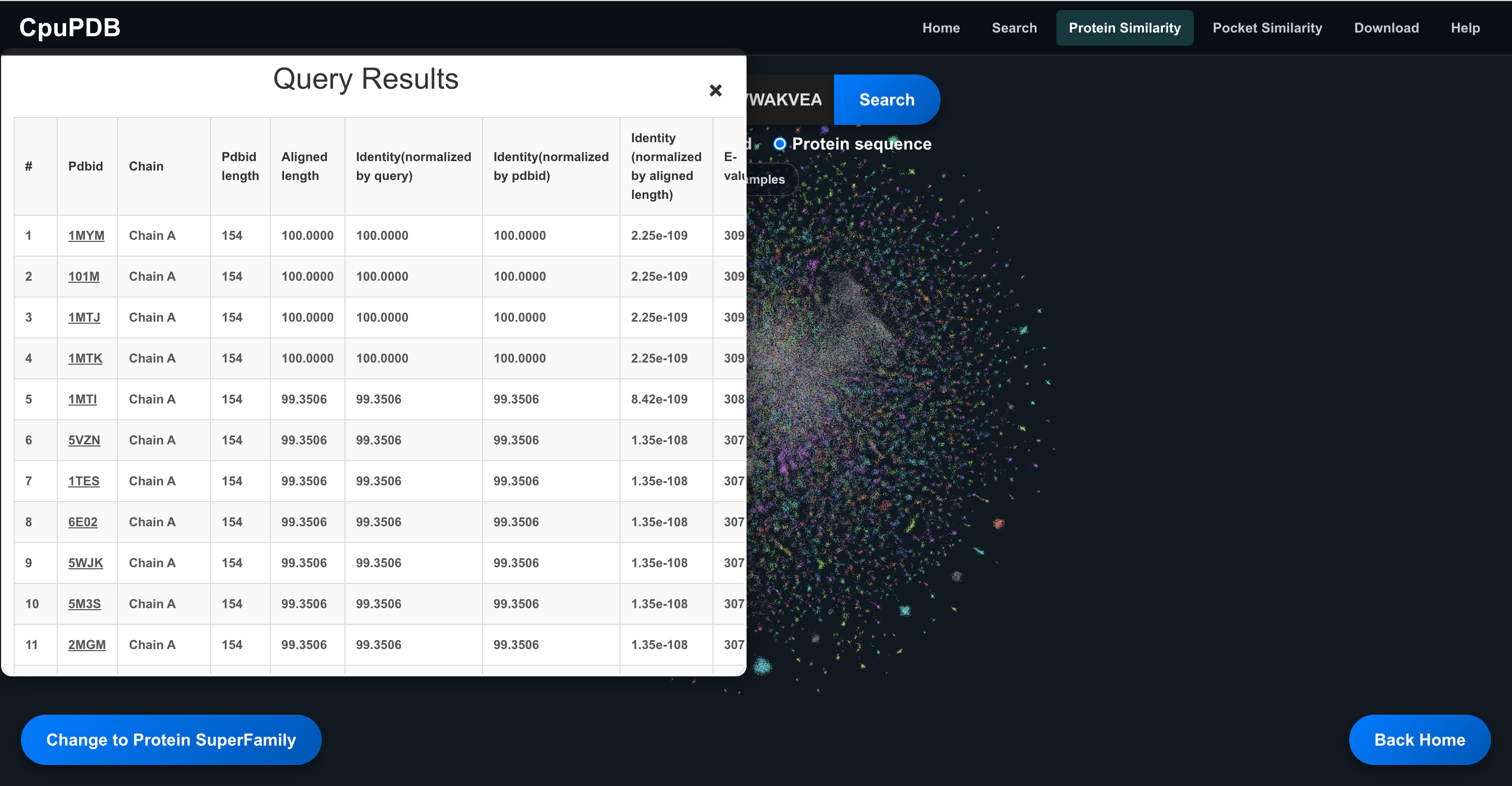
After submission, the query-results window lists homologous PDB chains ranked by BLAST alignment quality. Each row reports PDB ID and chain, PDB and aligned lengths, identity normalized by query, database sequence, aligned region, E-value, and bit score.
1.3 Dynamics Data Search
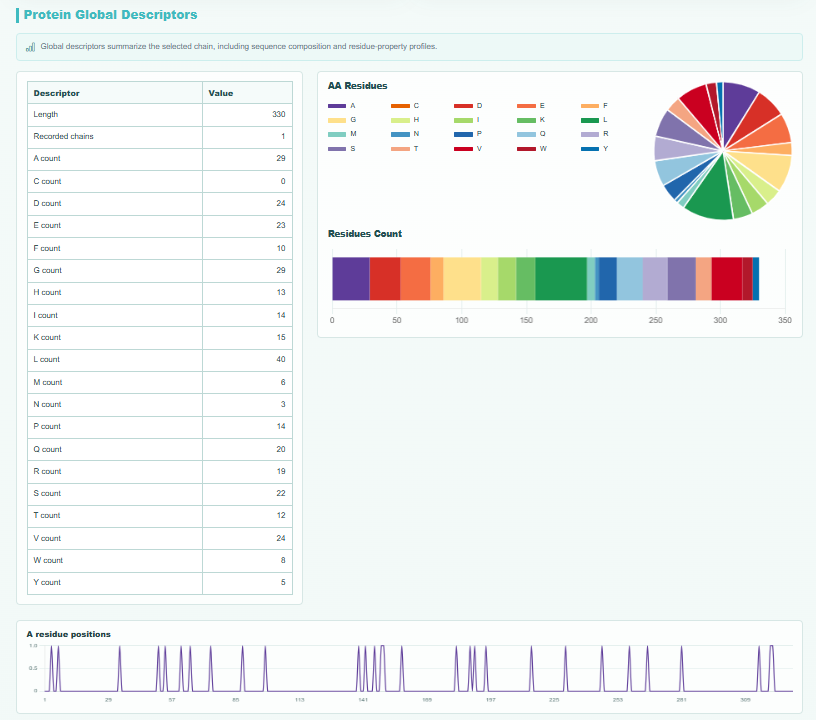
This retrieval mode targets entries with molecular dynamics pocket analysis records. Users can query trajectory-associated protein structures, analyze pocket conformational dynamics, visualize 3D dynamic pockets, download raw MD structure files, and inspect sequence-level protein global descriptors.
Workflow
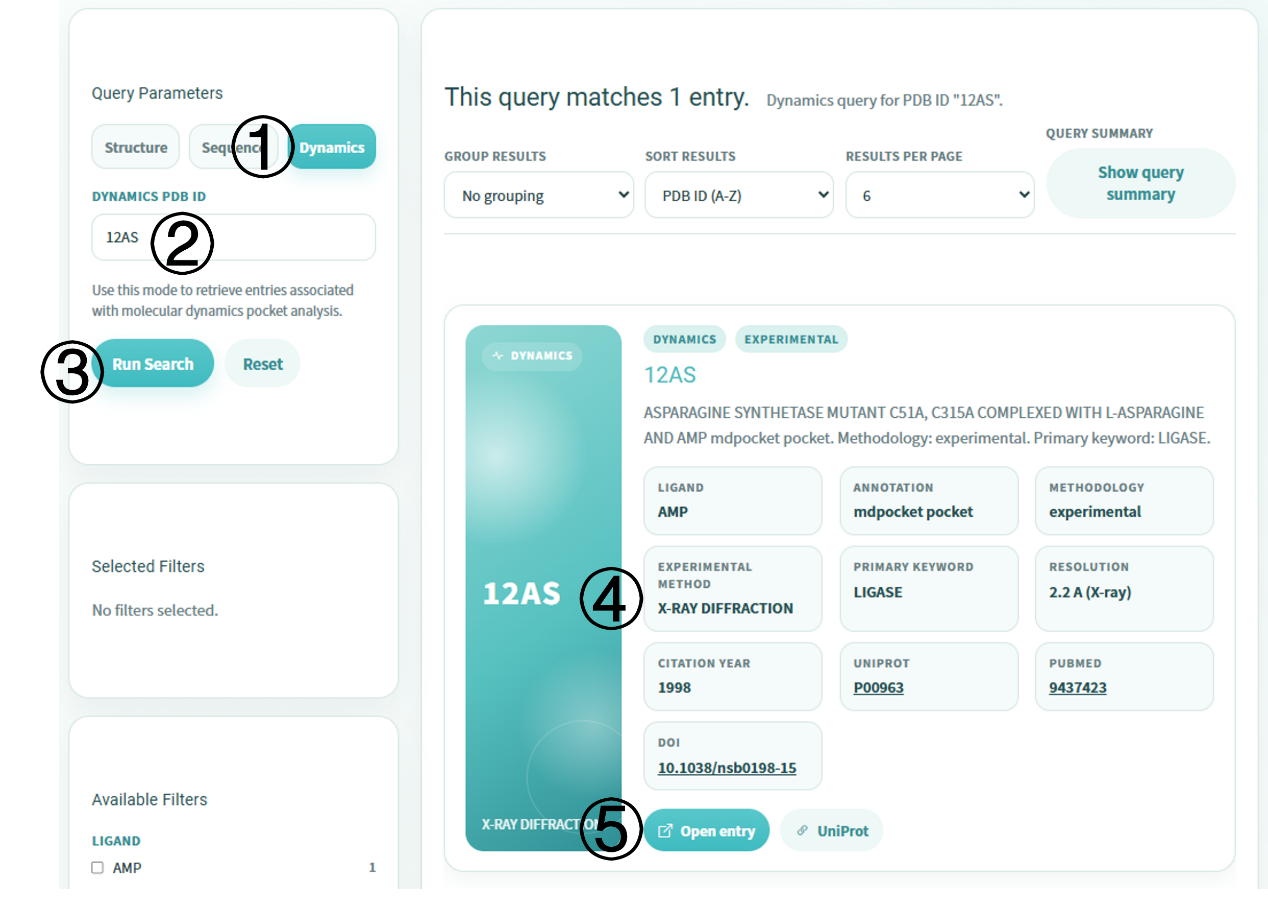
- Enter the search portal and switch to the Dynamics tab in the left Query Parameters panel.
- Input a target PDB ID, such as 12AS, into the Dynamics PDB ID field.
- Click Run Search. Ligand filters in the Available Filters section can further refine matched entries.
- Browse matched entries in the right panel. Each dynamics card displays ligand identity, mdpocket annotation, methodology, resolution, citation information, and external links.
- Click Open entry to access the full detail page for MD analysis.
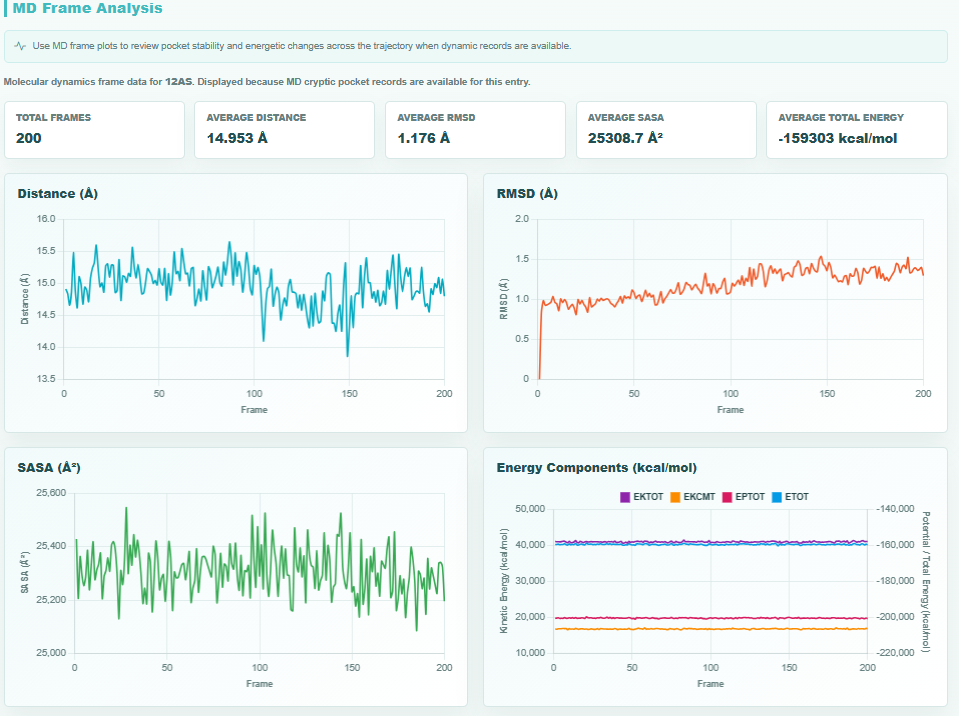
MD Frame Analysis
The top summary panel presents total frames, average ligand-protein distance, average RMSD, average SASA, and average total energy. Four interactive line charts visualize ligand-protein distance, RMSD, SASA, and energy components across the trajectory.
MD-Derived Pocket Visualization and Downloads
- Isovalue slider: controls the display of conserved cavities along the trajectory. Higher values indicate more stable internal pockets and channels.
- Reference.pdb: centroid frame from clustering analysis, used as the reference structure for mdpocket prediction.
- Density Map (mdpocket_dens.dx): grid file quantifying opening frequency for each pocket through the trajectory.
- Frequency Isosurface (mdpocket_freq_iso_0_5.pdb): PyMOL-compatible isosurface grid file for extracting target pocket regions.
Analysis Metrics
2. Protein Similarity Page
This interface visualizes protein family relationships through an interactive topological network. Each node represents a protein-ligand complex, and proteins belonging to the same taxonomic family are color-coded for homology recognition.
Workflow
- Select a query type from the top search bar: PDBid, InterPro id, or Protein sequence.
- Enter a PDB ID, such as 11GS, an InterPro accession number, or a protein sequence in FASTA format.
- Click Search. Matching nodes are highlighted while non-matching nodes are dimmed.
- Click a highlighted node to open the right-side information panel, including 3D preview, PDB ID, protein length, InterPro family, and homologous superfamily annotations.
- Click Download protein info to export protein annotation data, including ESM-calculated protein embeddings.
- Click Detail to navigate to the corresponding protein-ligand interaction detail page when precomputed pocket analysis data are available.
- Toggle between Family and Superfamily views to explore relationships at different classification levels.
3. Pocket Similarity Page
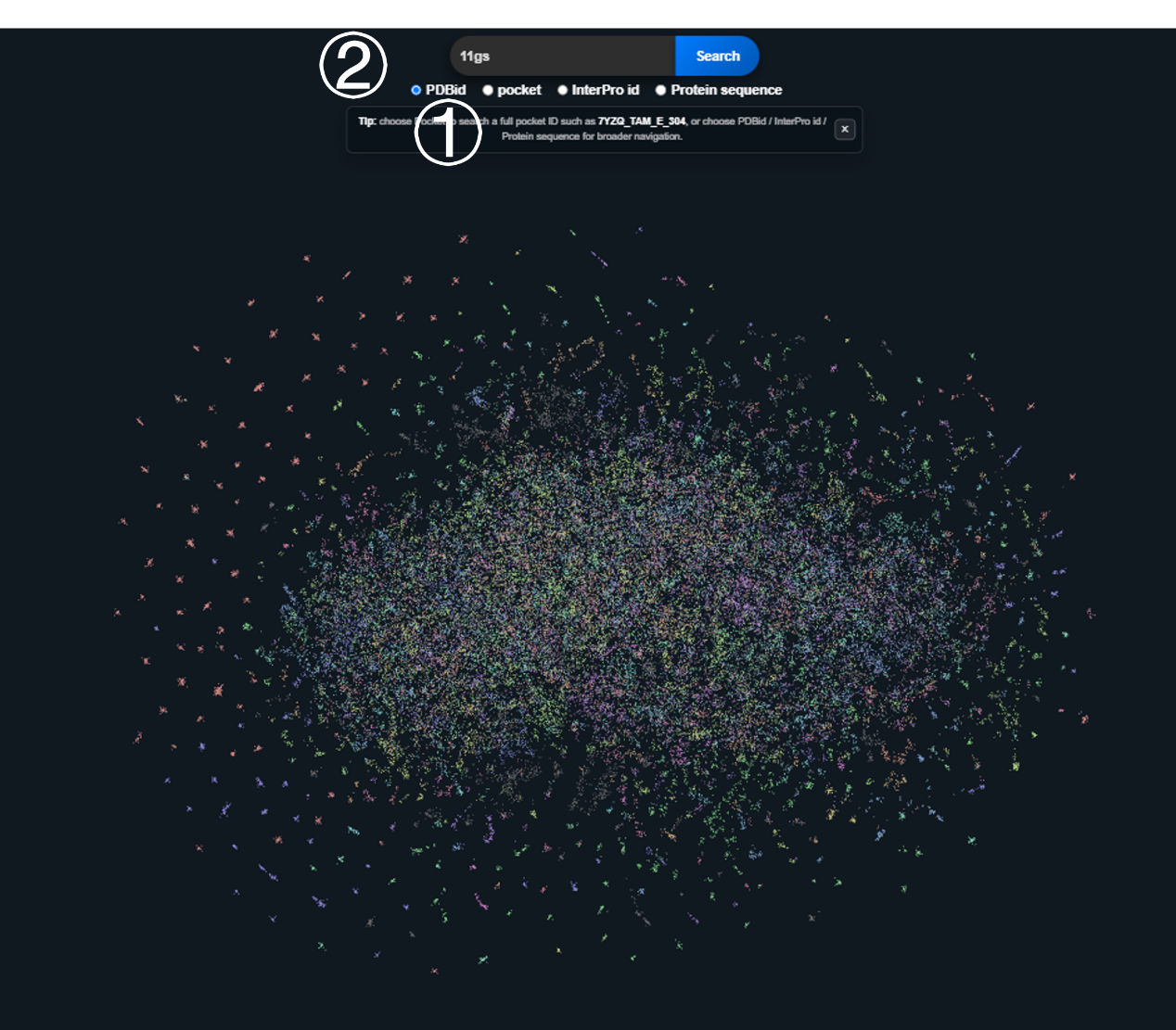
This interface visualizes the structural similarity landscape of protein binding pockets through an interactive topological network. Each node corresponds to a unique protein-ligand binding pocket, and pockets with analogous structural features are clustered and color-coded.
Workflow
- Select a query modality from the top search bar: PDBid, pocket, InterPro id, or Protein sequence.
- Input the query content, such as pocket identifier 7YZQ_TAM_E_304, a PDB accession, an InterPro ID, or a FASTA sequence.
- Click Search. Matching nodes are highlighted and non-matching nodes are dimmed.
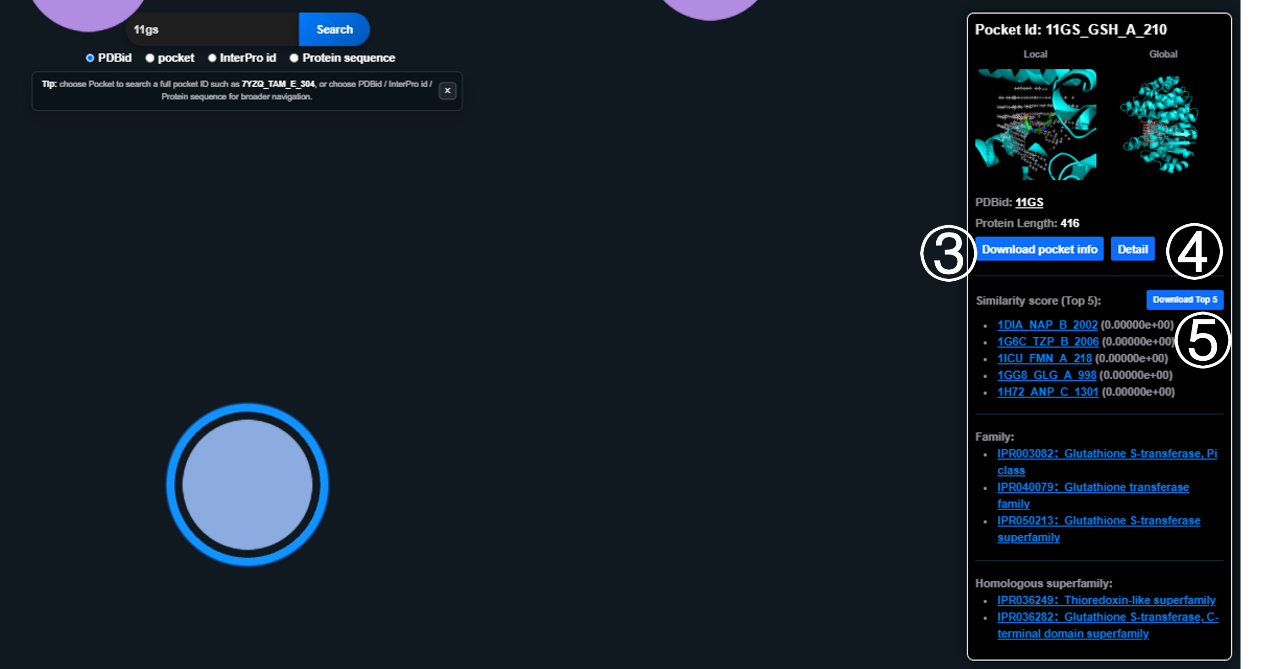
- Click a highlighted node to open the right-side information panel.
- Click Download pocket info to export the selected pocket annotation dataset.
- Click Download Top 5 to export complete annotation data for the top five structurally similar pockets.
- Click Detail to navigate to the protein-ligand interaction detail page when precomputed pocket analysis data are available.
Information Panel
- Dual structural previews: Local view of the pocket microenvironment and Global view marking the pocket position within the full protein structure.
- Basic pocket properties: full pocket ID, source PDB ID, and protein sequence length.
- Similarity score (Top 5): ranked list of the top five structurally similar pockets with scores.
- InterPro annotations: family and homologous superfamily IDs linked to the official InterPro database.
4. Download Page
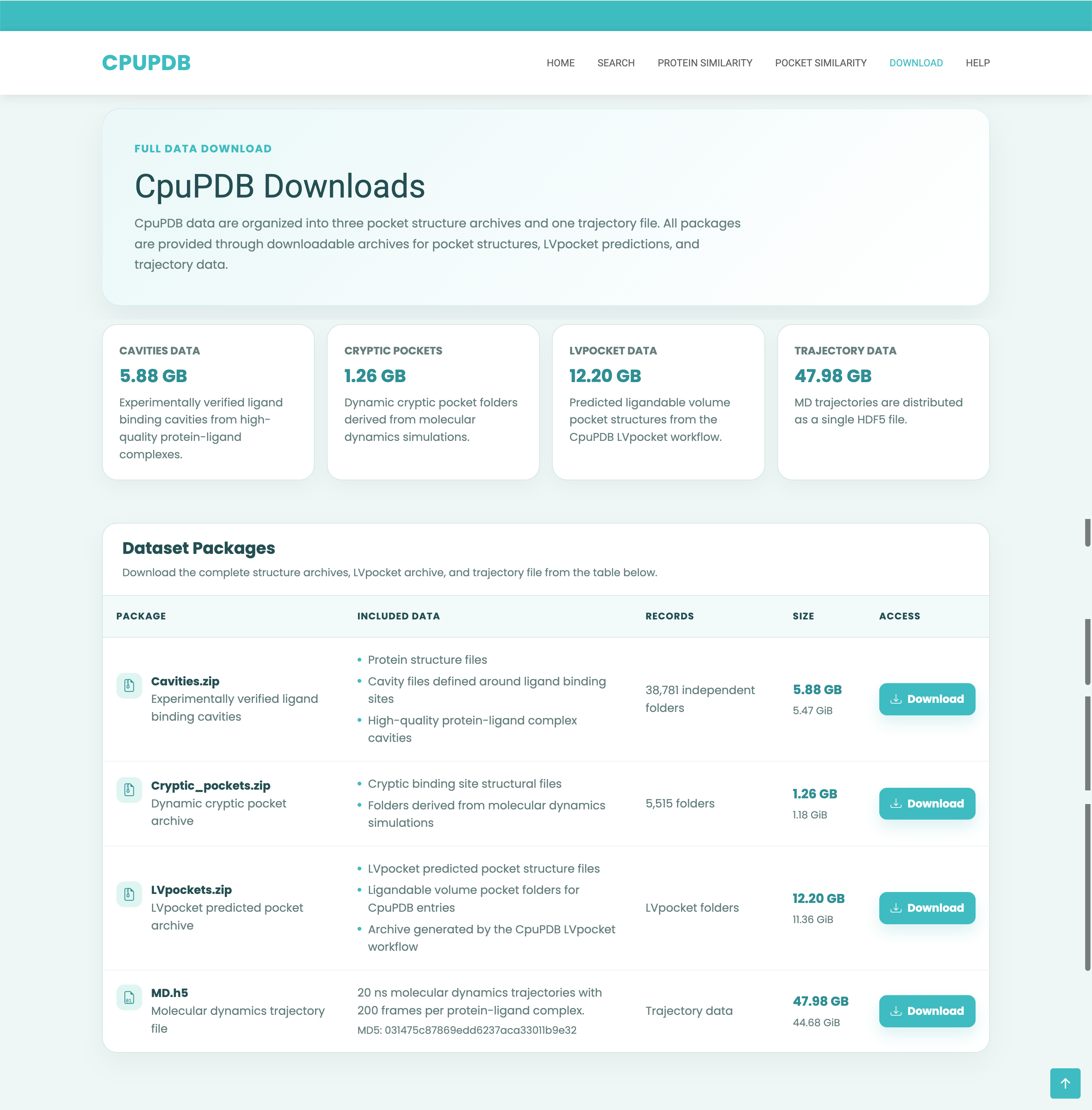
The Download page provides centralized access to the complete CpuPDB downloadable datasets. Dataset packages are distributed through Zenodo and are organized by pocket source and molecular dynamics trajectory data.
Workflow
- Open the Download page from the top navigation bar or footer link.
- Review the summary cards to compare dataset type and archive size before downloading.
- Locate the required package in the Dataset Packages table.
- Click Download in the Access column to open the corresponding Zenodo record.
- Download the archive or trajectory file from Zenodo for downstream local analysis.
Available Packages
- Cavities.zip: experimentally verified ligand binding cavities from high-quality protein-ligand complexes.
- Cryptic_pockets.zip: dynamic cryptic pocket folders derived from molecular dynamics simulations.
- LVpockets.zip: LVpocket predicted pocket structure files generated by the CpuPDB LVpocket workflow.
- MD.h5: molecular dynamics trajectory data for offline conformational analysis.